
QQ Music Add-on
A Carplay feature has been introduced for this popular streaming platform in China
Context
As part of the bootcamp by Designlab, I completed a solo add-a-feature capstone project for Music App
Role
UI/UX Designer
Product Designer
Time
75 hours, July 2024
Overview
QQ Music, a leading streaming app in China, already boasts a massive user base and unique features, making it tough to find areas for improvement. I chose this app for the challenge and designed everything from scratch due to the lack of an existing UI kit, including the logo, color scheme, typography, and an English interface translation. This project was a great opportunity to push my UI design skills further.
Problem
Solution
I’d like to explore ways to help drivers have a convenient and safe way to control music and navigation while driving, so they can stay focused on the road and enjoy a seamless in-car experience while listening to QQ music.
The user will have the right to customize the carplay setting based on their preference, so it will be easy for them to find the right function they want.
Why does QQ Music need this new feature?
QQ Music offers extensive features, including theme and logo customization on iOS. To stay current, it has integrated CarPlay support, catering to the growing trend of electric vehicles in China and enhancing user experience.
Research 1: Competitor Analysis
Researched 5 music/audio apps with CarPlay compatibility.

Strengths
Weaknesses
-
Offline Listening
-
Voice Control
-
Wide Compatibility
-
use cards to represent albumin on main screen (more pictures than text)
-
Language Barrier
-
Limited offline features
-
Ads in Free Version
-
Interface Learning Curve
Research 2: Interview
Interviewed 6 music app users (not limited to QQ Music) to gather insights on what they like and dislike about their current apps.
The primary result doesn’t really give actionable insights due to the numbers of participants, and also some of the challenges are not UI/UX related, for example, copy-right for songs
Research 3: CarOS
There are default templates for CarPlay widgets that need to be followed, which presents a design constraint. Additionally, the layout varies between systems, such as Google CarPlay and Apple CarPlay. I decided to focus on Apple CarPlay to streamline my research, as I am more familiar with its interface.

Define
Defining the problem for this project was challenging. Initially, I planned to implement a voice assistant feature to minimize the time drivers spend selecting songs. However, during a group critique session, I learned that voice control is already integrated into the car’s system, not within the app/widget itself. This feedback prompted me to rethink the problem and explore new ways to assist users without relying on voice commands.
How Might we
-
How might we design a seamless CarPlay interface for easy, distraction-free music and navigation control?
-
How might we enhance voice command accuracy for hands-free control of music and navigation?
-
How might we create customizable dashboard widgets for quick access to frequently used music and navigation features?
Persona

Inspiration
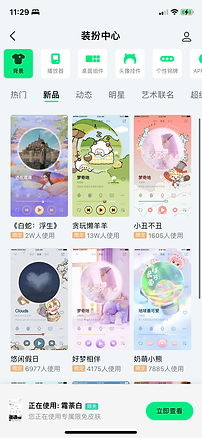
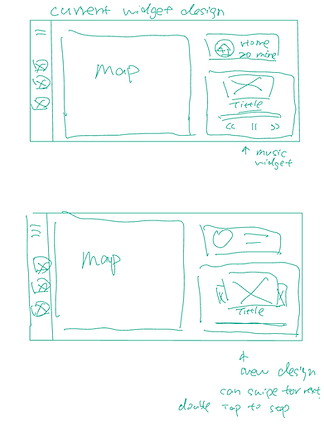
Inspired by QQ Music's customizable design, I extended this flexibility to widget features. Analysis showed that many playlists and features are rarely used, so I proposed removing them to keep only essentials, reducing driver scrolling time and enhancing efficiency.


Low-Fidelity Wireframes




Usability Test

One key piece of feedback was to exclude the voice control feature, as mentioned earlier. Additionally, users found the settings list in QQ Music to be too lengthy and suggested implementing collapsible sections. However, due to time constraints, I focused on creating a minimum viable product (MVP) for now, with plans to introduce these additional features in future updates.
Seven participants spent 10-15 minutes each testing two main task flows:
1. Removing the Radio feature from the dashboard
2. Keeping only the Playlist section on the homepage and viewing CarPlay
Metrics:
time to complete (complete within 2 minutes)
rating for ease of use ( /5)
number of dead clicks
number of questions asked during the test

Conclusion
Project Insights
I enjoyed this project because it allowed me to enhance an existing product by adding a new feature and introducing fresh concepts. This project focused more on UX than UI, as the concepts needed to be practical and designed to make people's lives easier.
Lessons Learned
I enhanced my UI skills by redesigning QQ Music from scratch, refining my icon design, and learning to integrate features seamlessly. I also improved my interview skills through active listening, leading to better design ideas. This project showcased my expertise across mobile and CarPlay platforms.
Challenges Faced
Identified a missing feature in QQ Music, created a custom UI kit, and learned CarOS standards. Practiced empathy for car owners' needs, and adjusted my approach after discovering voice control was already integrated in the car system.
Trade-offs
The feature I proposed is a settings function, so the UI design isn’t the focus. The main goal is to ensure users can access it easily. Prioritizing convenience and simplicity, I decided against creating a more visually engaging feature.